Duration 2h 39m Project Files Included MP4
Establishing a Texturing Pipeline Between MARI and ZBrush
Info:
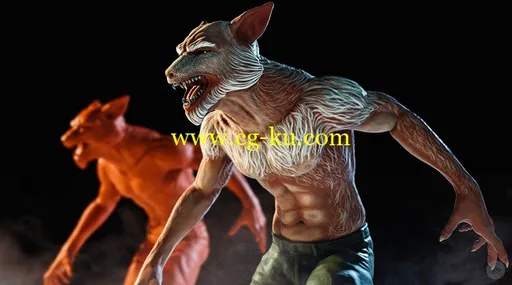
This course, Establishing a Texturing Pipeline Between MARI and ZBrush, will show you how to take your finished, sculpted, fantastic creation in ZBrush to use a better solution to painting textures for it. MARI is a powerful texturing tool used in feature films and it excels at painting high resolution meshes like the ones that ZBrush creates. First, you’ll start out in ZBrush and learn how to prepare your assets for painting in MARI. Next, you’ll learn about topology and resolution management as well as UV creation and geometry export. From there, you’ll dive into MARI and learn how to setup projects for UV and Ptex texturing painting. You’ll learn how to configure these projects using channels and shaders in MARI. Then, you’ll explore how to effectively paint your assets using MARI’s Paintbrush and Paint Through tool. Finally, you’ll learn how to render right inside of MARI using the MODO renderer and then how to export your textures out so they can be used in other applications. By the end of this course, you’ll have a good understanding of how easy it is to take your ZBrush creations and move them over into MARI so you can paint some amazing textures for them. Software required: MARI 3.1v1, ZBrush 4R7.
持续时间
2 h
39 m
项目
文件
包括
的
MP4
建立
马里
和
ZBrush
之间
的
变形
管线
信息
︰
这个
过程
中
,
建立
一个
纹理
MARI
之间
的
管道
和
ZBrush
,
将
显示
你
如何
采取
您
完成
、
雕刻
、
梦幻般
的
创作
在
ZBrush
使用
更好
的
解决方案
,
到
为
它
的
绘画
的
纹理
。
玛丽
是
一个
有力
的
变形
工具
,在
故事片
中
使用
并且
它
擅长
在
高
分辨
像
ZBrush
创建
网格
的
绘画
。
首先
,
你将
开始
在
ZBrush
并
学习
如何
为
绘画
在
MARI
准备
您
的
资产
。
接下来
,
您将
了解
拓扑
和
解决
管理
以及
UV
创作
和
几何
的
出口
。
从
那里
,
你会
潜入
马里
和
了解
如何
安装
项目
UV
和
Ptex
纹理
绘画
。
你将
学习
如何
配置
这些
项目
在
马里
使用
通道
和
着色器
。
然后
,
您将
探索
如何
有效地
画
你
的
资产
通过
工具
使用
马里的
画笔
和
颜料
。
最后
,
您将
学习
如何
呈现
在
马里
使用
MODO
渲染器
的
权利
,
然后
如何
导出
你
出
的
纹理
,
所以
他们
可以
在
其他
应用程序
中
使用
。
通过
这
门课程
结束
时
,
你会
有
很
好
地
理解
你
的
ZBrush
造物
并
搬进
他们
马里
这样
你
就
可以
为
他们
绘制
一些
令人惊异
的
纹理
是
多么
容易
。
所需
软件
︰
ZBrush
4R7
MARI
3.1v1
。